
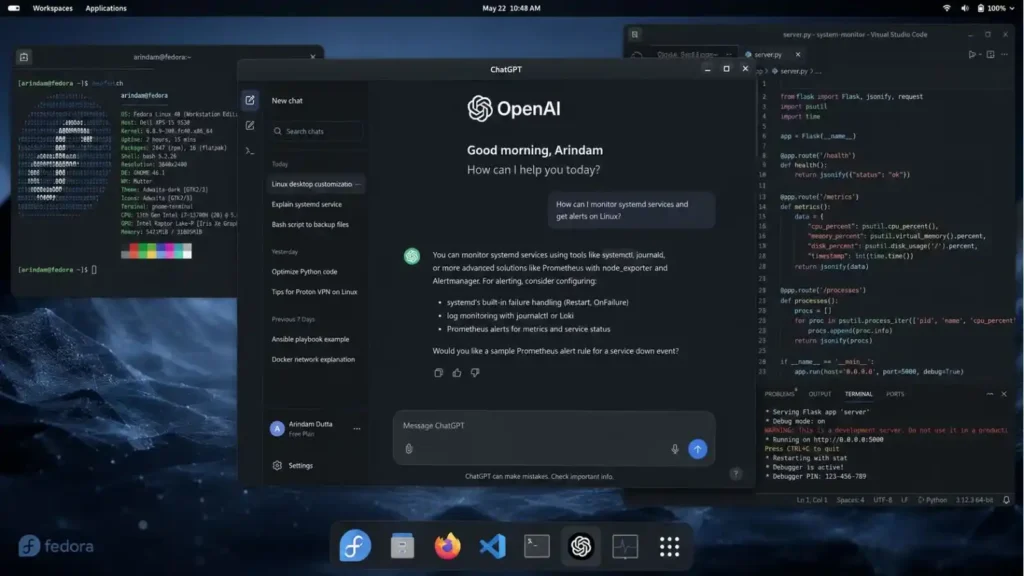
In a significant shift for open-source operating system users, OpenAI launches ChatGPT dedicated desktop application for Linux. Announced on August 11, 2026, the release ends a prolonged wait for developers and power users who have relied on web browsers or unofficial wrappers to access the popular AI assistant. This move aligns the Linux ecosystem with macOS and Windows, which have enjoyed native desktop applications for months.
The decision to build a native Linux client underscores the growing importance of the open-source community in the broader AI landscape. Developers utilizing Linux distributions such as Ubuntu, Fedora, and Debian frequently require local, low-latency access to AI tools for coding, system administration, and research. The new desktop app delivers exactly that, bypassing the browser overhead and integrating directly with the operating system's file management and terminal environments.
According to reporting by Lucas Ropek at TechCrunch, this rollout is not merely a port but a tailored application designed to respect the unique architectures and package management systems found across the open-source community. By providing a dedicated app, OpenAI aims to capture a highly technical demographic that values privacy, speed, and seamless workflow integration.
Key Takeaways
- OpenAI releases a native ChatGPT desktop application for Linux, ending reliance on browser-based access.
- The app supports major Linux distributions and package formats like
.deband.rpm. - Features include system tray integration, global hotkeys, and local file uploading for AI analysis.
- The launch signals OpenAI's recognition of the Linux developer community as a core user base.
OpenAI Launches ChatGPT for Linux: Technical Specifications and Features
The announcement that OpenAI launches ChatGPT for Linux marks a critical technical milestone. Previously, Linux users had to navigate the ChatGPT login via web browsers, which often lacked the seamless system-level integration found on proprietary operating systems. The new desktop app changes this dynamic by offering native support for major distributions.
The application is distributed via two primary package formats: .deb for Debian-based systems (like Ubuntu and Linux Mint) and .rpm for Red Hat-based systems (like Fedora and CentOS). Additionally, OpenAI has provided a Flatpak version, ensuring compatibility with sandboxed environments and distro-agnostic installation.
Native Integration and Performance
Unlike browser-based interfaces, the native desktop app leverages local system resources more efficiently. Key technical features include: (See also: Model ML Completes Finance Work More Efficiently with GPT-5.6 Sol)
- Global Hotkey Access: Users can invoke the ChatGPT window from anywhere using a customizable keyboard shortcut, bypassing the need to tab-switch to a browser.
- System Tray Integration: The app resides in the system tray, providing quick access to conversation history and settings.
- Drag-and-Drop File Uploads: Developers can drag local code files, logs, or documents directly into the chat interface for instant analysis.
- Dark Mode Synchronization: The app automatically detects and matches the system-wide theme, crucial for developers using dark mode GTK themes.
Why OpenAI Targets the Linux Ecosystem
The Linux user base, while smaller than Windows or macOS in desktop market share, punches far above its weight in software development, server administration, and AI research. By ensuring OpenAI launches ChatGPT natively on this platform, the company is cementing its relationship with the open-source community.
Developers often use Linux for its robust terminal environment and open-source ethos. The new app integrates clipboard management and terminal workflows, allowing users to quickly pipe outputs or errors directly into the ChatGPT interface. This is particularly relevant as developers look forward to upcoming model iterations, sometimes referred to in search trends as Chat GPT-5, which will require robust local clients to handle complex coding tasks and large context windows.
Industry Impact and Competitive Landscape
The decision to support Linux natively also puts pressure on competitors. While Anthropic's Claude and Google's Gemini offer powerful web interfaces, native desktop clients—especially for Linux—remain sparse. OpenAI's move sets a new standard for accessibility in the AI tools market.
As noted in the initial TechCrunch report by Lucas Ropek, the app is available for both free users and subscribers. Those using ChatGPT free can access the standard GPT-4o-mini model, while Plus, Team, and Enterprise subscribers can leverage the full power of GPT-4o. This tiered access ensures that the app is useful for casual open-source enthusiasts and enterprise engineering teams alike. For those looking to understand the broader context of these models, our internal guide on OpenAI's model evolution provides a deep dive into the architecture changes from GPT-3 to the current generation.
System Requirements and Installation
To run the ChatGPT desktop app on Linux, users need a relatively modern system. The minimum specifications ensure that the Electron-based wrapper runs smoothly without taxing system resources.
Installation is straightforward. Users can download the appropriate package from the official OpenAI website and install it via their distribution's package manager (e.g., sudo dpkg -i chatgpt-desktop.deb or sudo dnf install chatgpt-desktop.rpm).
The Future of AI on Open Source Platforms
The fact that OpenAI launches ChatGPT for Linux is a testament to the operating system's critical role in the future of computing. As AI becomes more embedded in the development lifecycle, having native, low-latency tools is no longer a luxury but a necessity. Explore our coverage of AI integration in developer workflows to see how these tools are changing software engineering paradigms.
Looking ahead, the availability of a native client opens the door for more advanced features, such as local RAG (Retrieval-Augmented Generation) capabilities that can securely index a user's local file system without sending data to the cloud until a prompt is executed. This addresses a major concern for privacy-conscious Linux users. Furthermore, as the landscape of OpenAI chat GPT evolves, native apps will be crucial for deploying features like voice mode and real-time code execution effectively.
Key Takeaways
- OpenAI releases a native ChatGPT desktop application for Linux, ending reliance on browser-based access.
- The app supports major Linux distributions and package formats like .deb and .rpm.
- Features include system tray integration, global hotkeys, and local file uploading for AI analysis.
- The launch signals OpenAI's recognition of the Linux developer community as a core user base.
FAQ
What are the 5 things you shouldn't tell ChatGPT?
You should avoid sharing personal identifiable information (like Social Security numbers), financial details (bank accounts, credit cards), passwords or security codes, confidential work data, and medical records. AI models can use data to train future versions, so sharing sensitive information poses a privacy risk. (See also: Expanding Daybreak Cyber: OpenAI Launches GPT-5.6-Cyber for Vulnerability Research)
Why are people leaving ChatGPT?
Some users are exploring alternatives due to concerns over data privacy, occasional performance degradation or hallucinations, subscription costs, or the desire to use open-source models. Others switch to competitors like Claude for specific tasks like long-form writing or coding.
What's the difference between ChatGPT and OpenAI?
OpenAI is the artificial intelligence research company that develops AI models. ChatGPT is a specific product—an AI chatbot application—created by OpenAI. OpenAI also develops the GPT series of models, DALL-E for image generation, and Sora for video generation.
Why is ChatGPT called GPT?
ChatGPT stands for Chat Generative Pre-trained Transformer. 'Generative' refers to its ability to generate text, 'Pre-trained' indicates it was trained on a vast dataset before deployment, and 'Transformer' is the underlying neural network architecture that powers the model.